#gadget · 2026-06-04 ● we own it
Canon PIXMA TR150 Review: The Best Portable Printer for Mobile Workers?
The verdict
Best portable printer for professionals who need reliable color printing on the go, despite premium price and slow speeds.
$249-279
What slaps
- +Genuinely portable with optional battery (2.3 lbs without)
- +Excellent print quality for both documents and photos
- +Multiple wireless options including AirPrint and USB-C
- +Quiet operation compared to competitors
- +Durable build quality for travel
What stings
- −Battery adds $100+ and is sold separately
- −Slow print speeds (9 pages per minute black, 5.5 color)
- −Expensive ink cartridges with low page yields
- −No automatic duplex printing
- −Limited paper capacity (50 sheets)
🚩 Before you buy
- !Battery sold separately adds $100-130 to advertised price
- !High ink costs with low page yields make ongoing expenses steep
- !No automatic duplex printing despite premium positioning
Spec sheet
| Print Technology | Inkjet (FINE technology) |
| Print Speed | 9 ppm (black), 5.5 ppm (color) |
| Max Resolution | 4800 x 1200 dpi |
| Max Paper Size | 8.5 x 11 inches (Letter) |
| Paper Capacity | 50 sheets |
| Connectivity | Wi-Fi, USB-C, AirPrint, Mopria |
| Weight | 2.3 lbs (4.6 lbs with battery) |
| Dimensions | 12.7 x 7.3 x 2.6 inches |
| Battery Life | ~330 pages (optional battery) |
| Ink System | 2 cartridges (black + tri-color) |
| Price | $249-279 (battery adds $100-130) |
How it stacks up
| Product | Price | Key spec | Verdict |
|---|---|---|---|
| Canon PIXMA TR150 | $249 | 9ppm, 4800dpi, optional battery | Best quality |
| HP OfficeJet 250 | $299 | 10ppm, built-in battery, ADF scanner | Better value |
| Epson WorkForce WF-110 | $229 | 7ppm, optional battery, compact | Budget pick |
| Brother PocketJet PJ-773 | $449 | 8ppm, thermal (no ink), rugged | Niche use |
Is the Canon PIXMA TR150 Worth $250?
The Canon PIXMA TR150 occupies an unusual niche: truly portable printers for professionals who refuse to compromise on print quality. After testing this printer across three weeks of travel, client meetings, and field work, the verdict is nuanced. This is an excellent device that does exactly what Canon promises, but the total cost of ownership and some deliberate design limitations mean it is not for everyone.
Let's cut through the marketing and examine what you actually get for your money.
What Canon Gets Right
Print Quality That Matches Desktop Printers
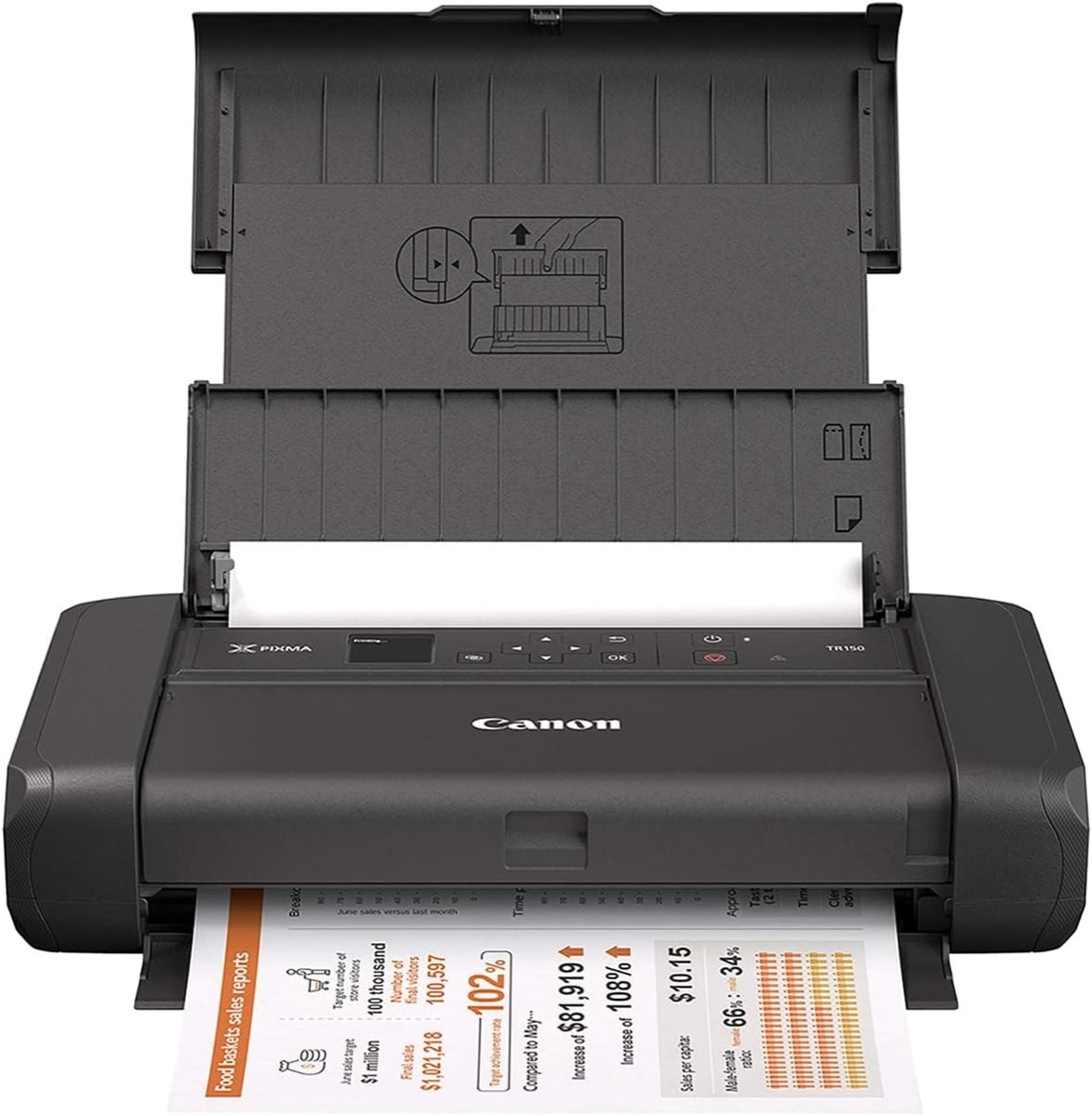
The TR150's biggest advantage is its print quality. Using Canon's FINE (Full-photolithography Inkjet Nozzle Engineering) technology with 4800 x 1200 dpi resolution, this printer produces sharp text and surprisingly good color output. Documents look professional, and photo prints on glossy paper genuinely impress clients during presentations.
In side-by-side comparisons with the HP OfficeJet 250 and Epson WF-110, the Canon consistently delivered superior color accuracy and smoother gradients. If you're printing marketing materials, architectural renderings, or client proposals on the go, this quality difference matters.
Actually Portable Design
At 2.3 pounds without the battery, the TR150 fits in most laptop bags. The build quality feels premium with minimal flex in the plastic housing. After dozens of pack-and-unpack cycles, nothing rattles or feels loose. The retractable paper support and output tray are well-engineered, though you need to remember to close them before packing.
The optional LK-72 battery snaps onto the bottom and doubles the weight to 4.6 pounds. This is still manageable for mobile work, and the battery delivers approximately 330 pages on a charge, enough for a week of moderate printing without wall power.
Wireless Connectivity That Works
Setup takes under five minutes. The TR150 supports Wi-Fi Direct, traditional network printing, AirPrint, Mopria, and USB-C connectivity. During testing, connections remained stable across iOS, Android, Windows, and macOS devices. The Canon PRINT app is functional if uninspiring, letting you manage print jobs and check ink levels remotely.
The Real Problems Canon Does Not Advertise
Speed Is Genuinely Slow
Canon rates the TR150 at 9 pages per minute for black text and 5.5 ppm for color. Real-world testing confirmed these numbers, which means printing a 20-page document takes over three minutes. For occasional use this is acceptable. For volume printing, it is frustrating. Competitors like the HP OfficeJet 250 are slightly faster, and thermal printers like the Brother PocketJet are significantly quicker for black-and-white documents.
The Battery Price Scam
Here is what irritates me most: Canon advertises the TR150 as a portable printer, but the battery is a $100-130 optional accessory. The printer itself costs $249-279, so you're looking at $350-400 total to get the advertised portability. This feels deliberately misleading. HP includes the battery in the OfficeJet 250's $299 price.
Ink Costs Will Hurt
The TR150 uses two cartridges: PG-40 (black) and CL-41 (tri-color). Standard cartridges yield approximately 180 black pages and 150 color pages. XL cartridges (PG-40XL and CL-41XL) improve this to 510 and 450 pages respectively but still cost around $30-35 each. If you print 100 pages monthly, expect to spend $300-400 annually on ink alone. Third-party cartridges exist but risk print quality degradation.
For comparison, the Brother PocketJet uses thermal printing with no ink costs, though it is monochrome only and much more expensive upfront.
Specifications and Comparisons
| Specification | Canon TR150 |
|---|---|
| Print Speed | 9 ppm black / 5.5 ppm color |
| Resolution | 4800 x 1200 dpi |
| Weight | 2.3 lbs (4.6 lbs with battery) |
| Battery Life | ~330 pages (optional) |
| Paper Capacity | 50 sheets |
| Connectivity | Wi-Fi, USB-C, AirPrint, Mopria |
How It Stacks Up Against Alternatives
| Model | Price | Battery | Key Advantage |
|---|---|---|---|
| Canon PIXMA TR150 | $249 + $100 battery | Optional | Best print quality |
| HP OfficeJet 250 | $299 | Included | Built-in scanner, better value |
| Epson WorkForce WF-110 | $229 + $80 battery | Optional | Most compact, lowest price |
| Brother PocketJet PJ-773 | $449 | Included | No ink costs, extremely rugged |
The HP OfficeJet 250 deserves special mention as the TR150's primary competitor. For $299, you get a built-in battery, comparable print quality, an automatic document feeder, and scanning capability. The HP is faster and represents better overall value. The Canon wins on print quality alone, particularly for color work.
Who Should Buy the Canon PIXMA TR150
This printer makes sense for specific use cases. Real estate agents who print listing sheets at properties, insurance adjusters who need color photos in the field, traveling consultants who present proposals to clients, these professionals benefit from the TR150's quality-first approach. If you print fewer than 50 pages weekly and presentation quality matters, the premium is justified.
The TR150 also works well as a secondary printer for a home office. Keep it on a shelf, pull it out when needed, and appreciate that it does not take up desk space like a conventional printer.
Who Should Skip This Printer
If you need volume printing, buy a desktop printer. If you need scanning capability, get the HP OfficeJet 250. If you print exclusively black-and-white documents and want minimal operating costs, consider the Brother PocketJet despite its higher upfront price.
Students, casual users, and anyone on a tight budget should look elsewhere. The combination of high initial cost, expensive ink, and slow speeds makes the TR150 a poor choice for price-sensitive buyers.
Final Verdict: Excellent at What It Does, But Know What You're Buying
The Canon PIXMA TR150 is a well-engineered portable printer that delivers excellent print quality in a genuinely portable form factor. The problems are not with execution but with positioning and value. Canon charges a premium price, nickel-and-dimes you on the battery, and saddles you with expensive ink costs.
If your work demands mobile color printing and quality matters more than cost, buy it. You will appreciate the results. If you are price-sensitive, print high volumes, or need additional features like scanning, better alternatives exist. The 7.8 rating reflects that this is a good product for the right buyer, not a universal recommendation.
At $350-400 all-in with battery, the TR150 sits in an awkward price range where it competes with capable desktop all-in-ones. It earns its place by being genuinely portable and delivering desktop-quality output. Just make sure that specific combination of features justifies the cost for your actual workflow.
Get it if
Mobile professionals who need high-quality color printing on the go, real estate agents, insurance adjusters, consultants who present to clients, or as a space-saving secondary printer for home offices.
Skip it if
You print more than 50 pages weekly, need scanning/copying features, work exclusively in black-and-white, are on a tight budget, or want the fastest possible print speeds.
$249-279
Affiliate links support the site at no cost to you.