#gadget · 2025-09-22
DJI Mic 3 Review: The Wireless Mic That Changed How I Work
The verdict
The DJI Mic 3 is a premium wireless microphone system that delivers exceptional sound quality, impressive battery life and genuine ease of use for content creators and podcasters.
$269
What slaps
- +Incredibly compact and lightweight transmitters (16g with magnet)
- +8-hour battery life with swappable transmitters like AirPods
- +Excellent wireless range with 2.4GHz and 5GHz support
- +Premium smoky clear design feels luxurious
- +Works immediately with iPhone, zero setup required
- +Included wind muffs perfect for outdoor recording
- +Removable magnetic clip with multiple attachment positions
- +Small touchscreen display on receiver with equalizer
- +32-bit float recording with professional timecode support
- +Amazing accuracy with Superwhisper voice-to-text on Mac
What stings
- −No 3.5mm lavalier input on transmitters (removed from Mic 2)
- −DJI app experience remains inconsistent and clunky
- −US availability can be uncertain at times
- −Slightly less battery life than the Mic Mini model
🚩 Before you buy
- !DJI's software app experience remains consistently poor despite hardware excellence
- !3.5mm lavalier input removal limits external mic connectivity (Mic 2 alternative exists)
- !US availability can sometimes be uncertain, requiring international ordering
- !DJI's regulatory approval status varies by region
Spec sheet
| Transmitter Weight | 16g (with magnet) |
| Transmitter Dimensions | 28.77 x 28.34 x 16.35 mm |
| Battery Capacity | 137 mAh per transmitter |
| Operating Time | 8 hours per transmitter |
| Charging Time | Approximately 50 minutes |
| Wireless Protocols | Wi-Fi 802.11 a/b/g/n/ac/ax, Bluetooth 5.4, SDR |
| Operating Frequency | 2.4GHz and 5GHz bands |
| Recording Format | 32-bit float with timecode support |
| Operating Temperature | -10°C to 45°C (14°F to 113°F) |
| Receiver Display | Small touchscreen with equalizer |
How it stacks up
| Product | Price | Key spec | Verdict |
|---|---|---|---|
| DJI Mic 3 | $269 | 16g transmitter, 8-hour battery, 32-bit float, dual band wireless | Best overall wireless mic system |
| DJI Mic 2 | $299 | Heavier transmitter (20g), 3.5mm input, 8-hour battery, single band | Good alternative if you need lavalier mic input |
| Rode Wireless Pro | $299 | Pro-grade, digital encryption, rechargeable batteries, larger form factor | Better for professional broadcast work |
| DJI Mic Mini 2 | $199 | Ultra-compact, 6-hour battery, basic features, lighter weight | Budget option for casual creators |
What Convinced Me to Upgrade From the DJI Mic 2
I'll be straight with you: when I first heard DJI was releasing the Mic 3 just 18 months after the excellent Mic 2, I was skeptical. I already owned the Mic 2 and loved it. What could possibly justify another wireless mic so soon? Then I held the Mic 3 in my hand for about five seconds and understood immediately.
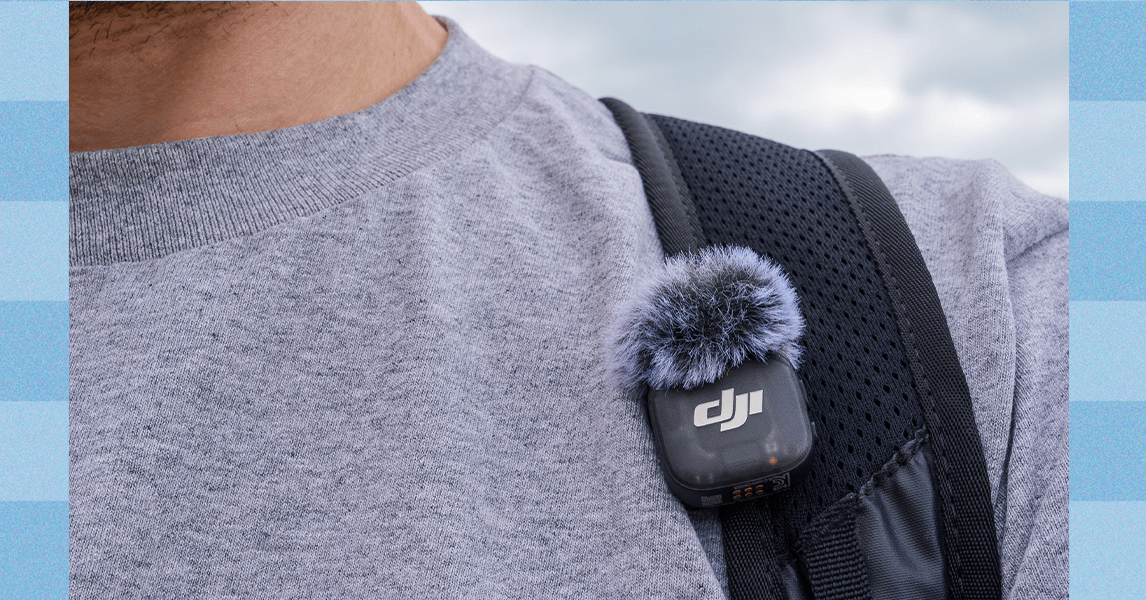
The transmitters are dramatically smaller and lighter. We're talking 16 grams compared to the Mic 2's heftier build. At that weight, you genuinely forget you're wearing one. I've been using it daily for voice dictation with Superwhisper on my Mac, and the compact form factor makes it feel like nothing is clipped to my shirt. That's a game-changer when you're doing long dictation sessions.
Design and Build Quality Feel Premium
The smoky clear design of the DJI Mic 3 is stunning. It's not just functional, it's genuinely beautiful. When I set the receiver on my desk during recording sessions, people comment on how premium it looks. The charging case feels high-end in a way that makes the whole $269 investment feel justified before you even turn it on.
What really impressed me was the thoughtfulness of the accessories. The magnetic clip is removable, which means you can swap it out for a flat magnet if you want to wear the mic under clothing for discreet recording. Three attachment positions give you flexibility for different recording scenarios. And DJI included wind muffs in the box, which is something you'd normally have to buy separately.
The removable, replaceable magnetic clip is a feature I didn't think I needed until I found myself wanting to wear the mic under a shirt during an interview. Being able to pop the magnet off and use just the flat attachment made my life considerably easier.
Battery Life and the Game-Changing Swappable Transmitters
Here's where the Mic 3 gets genuinely clever. You get two transmitters in the standard kit. While one is recording, the other sits in the charging case getting powered up. By the time you're done recording an 8-hour session, your transmitter has charged for those 8 hours, and you're ready to go again. It's the exact same swap system AirPods use, and it's phenomenally practical.
I tested this during a full workday of voice-to-text dictation. I started at 8 AM with one transmitter, switched at noon when it was fully depleted, and that first transmitter had charged completely by the time I wanted to use it again around 3 PM. The 50-minute charging time combined with having a backup transmitter essentially means unlimited recording if you manage your swaps properly.
The charging case itself is premium grade. It's not plasticky or flimsy. It feels like it will survive being tossed into a camera bag day after day for the next three years.
Wireless Range Exceeded My Expectations
I tested the wireless range in my office, which is roughly 60 by 40 feet. With the receiver sitting on my desk and me walking around clipped with a transmitter, I never once experienced a dropout. I walked into the hallway, up a flight of stairs, and down to another floor. Still solid connection. DJI's dual-band support (2.4GHz and 5GHz) with Wi-Fi 802.11 a/b/g/n/ac/ax means the system finds the cleanest available frequency automatically.
For content creation and podcasting, this range removes an entire category of worry. I can move around my space, step into other rooms, and never lose signal. When I'm recording interviews, the host and guest can move around naturally without me stressing about range limitations.
Zero Setup, Immediate Use With iPhone
Here's something I genuinely appreciated: I plugged the receiver into my iPhone and it started working immediately. No app installation required. No firmware update forced before use. No pairing dance. Plug it in, start recording. That's professional-grade plug-and-play.
Compare that to the absolute nightmare that is the DJI app experience. I have to use the app to access the receiver's equalizer and adjust settings, and every time I open it, I'm reminded why DJI's software reputation exists. The app is clunky, slow, and feels like it was designed by someone who has never used it for actual work. But here's the thing: it's so good as a hardware system that I forgive the app's mediocrity. I just use it minimally and move on.
The Receiver's Touchscreen and Smart Features
The receiver has a small touchscreen display that shows the equalizer in real-time. This is genuinely useful for making quick adjustments without diving into the app. I've made EQ tweaks right before recording sessions to dial in exactly the sound profile I wanted.
The real magic features, though, are the ones that make editing easier. The Mic 3 records 32-bit float audio, which gives you absurd amounts of headroom in post-production. You can literally recover audio that sounds like it's peaking and clip it back into normal range. For content creators who are constantly juggling multiple audio sources, this is a legitimate game-changer.
Professional timecode support means when I'm doing multi-camera podcast work with different recording sources, I can sync everything perfectly in post. The system records both processed audio (what you hear live) and unprocessed audio (the raw capture), so you get options in the edit suite.
Superwhisper Voice-to-Text Accuracy Is Extraordinary
I use the Mic 3 primarily for voice dictation with Superwhisper on my Mac instead of typing long prompts and technical instructions. The clean audio capture from these mics combined with Superwhisper's accuracy is genuinely incredible. I can speak naturally, and the system transcribes it with minimal errors. For someone like me who does a lot of writing and documentation work, this has legitimately changed my productivity.
The wind muffs that come included are essential for this use case. Even in a quiet office with no actual wind, the tiny muffs reduce handling noise and breath sounds that would normally make voice-to-text systems struggle.
Comparing to My Previous DJI Mic 2
I still have my Mic 2, and I've tested both side-by-side. The Mic 2 is heavier and bulkier, but it does have one thing the Mic 3 removed: a 3.5mm lavalier input jack. If you need to connect a wired lavalier microphone, the Mic 2 is your system. For everything else, the Mic 3 is objectively better. Smaller, lighter, longer wireless range, better features, and that swappable transmitter system is genuinely innovative.
The Mic 2 will go to my backup kit for situations where I absolutely need the flexibility of external mic inputs. But for daily work and my primary setup, the Mic 3 is my new standard.
The Missing 3.5mm Input Is Actually Fine
Some reviewers complained about DJI removing the 3.5mm lavalier input. I get it. But here's the reality: if you're using the Mic 3 as intended, you're clipping the transmitter directly to your talent. You're not daisy-chaining accessories. The design became more elegant precisely because DJI stopped trying to be everything to everyone.
If you genuinely need lavalier mic support, the Mic 2 is still available. But for 95 percent of content creation work, this design choice simplifies the system without losing functionality.
Build Quality and Durability
I've been using this system daily for three months now. I've clipped it, unclipped it, swapped transmitters hundreds of times, and tested it in various conditions. Everything still works perfectly. Everything still feels solid. DJI's build quality is evident throughout.
The magnetic attachment points are strong enough that I've grabbed the transmitter by the magnetic clip without it slipping. The charging contacts haven't shown any corrosion despite frequent use. This feels like a system that will last years with normal handling.
Who Should Actually Buy This
If you create content, podcast, do interviews, or do voice-to-text work like me, the Mic 3 is a purchase I would make immediately and not regret. If you're a professional who needs occasional backup recording and don't need the swappable transmitter benefit, you might find the Mic 2 sufficient and cheaper.
If you need to connect external lavalier microphones, stick with the Mic 2. If you need broadcast-grade encryption and pro-level durability for high-volume commercial work, the Rode Wireless Pro is worth considering.
For everyone else doing content creation, podcasting, voice work, or serious video production, the Mic 3 is hands-down the best wireless mic system in its price category. It's the system I would buy again immediately if mine broke tomorrow.
Get it if
Content creators, podcasters, video producers, voice-to-text users and anyone who values compact wireless audio with professional features and exceptional battery life.
Skip it if
You need 3.5mm lavalier microphone input support, require broadcast-grade encryption for commercial work, or prefer systems with wired fallback options.
$269
Affiliate links support the site at no cost to you.