#smart-home · 2025-11-20 ● we own it
iRobot Roomba 980: An Aging Workhorse, Worth It Only at a Steep Discount
The verdict
At $300 or more, the 980 is overpriced for its age and missing key features. Look for modern alternatives with lidar, auto-empty, and better obstacle avoidance.
$250-$350 (market range as of 2026)
What slaps
- +Effective carpet cleaning with iRobot’s Carpet Boost technology
- +vSLAM camera navigation provides room-level mapping and training
- +Solid build quality and reliable brand support
- +App and voice assistant integration work well
What stings
- −No auto-empty bin, user must empty dustbin frequently
- −Camera navigation struggles in low light or on dark/reflective floors
- −Lacks advanced obstacle avoidance (can tangle in cords or small objects)
- −Outdated compared to lidar-equipped robots at similar prices
Spec sheet
| Navigation | iAdapt 2.0 with vSLAM (camera-based) |
| Suction Power | Approx. 1700 Pa (not officially rated) |
| Battery Life | Up to 120 minutes (hard floor), ~60 minutes (carpet with boost) |
| Dustbin Capacity | 500 ml |
| Connectivity | Wi-Fi 2.4 GHz, iRobot HOME app, Amazon Alexa / Google Assistant |
| Dimensions | 13.4 x 13.4 x 3.6 inches (34 x 34 x 9.1 cm) |
| Weight | 8.5 lbs (3.9 kg) |
How it stacks up
| Product | Price | Key spec | Verdict |
|---|---|---|---|
| iRobot Roomba 980 | $300 (typical price) | Camera vSLAM, 1700 Pa suction | Capable but outdated. Buy only if on sale for under $250. |
| iRobot Roomba j7+ | $599 | AI obstacle avoidance, auto-empty base | Much better for homes with clutter; higher cost but peace of mind. |
| Roborock S7 MaxV | $499 | Lidar + AI, mopping, 2500 Pa | Superior mapping, stronger suction, and mopping, the current king of value. |
Introduction
The iRobot Roomba 980 debuted in 2015 as a flagship robot vacuum, bringing camera-based simultaneous localization and mapping (vSLAM) to the consumer market. It was one of the first robots that could learn and remember floor plans, clean in neat rows, and even let you label rooms for customized cleaning routines. Fast forward to 2026, and the landscape has changed dramatically. Lidar-based navigation is now common at much lower prices, auto-empty bases are expected, and AI-powered obstacle avoidance has become a must-have for many. In this review, we revisit the Roomba 980, evaluate its performance today, and help you decide if it still deserves a spot in your home, or if you should move on.
Design and Setup
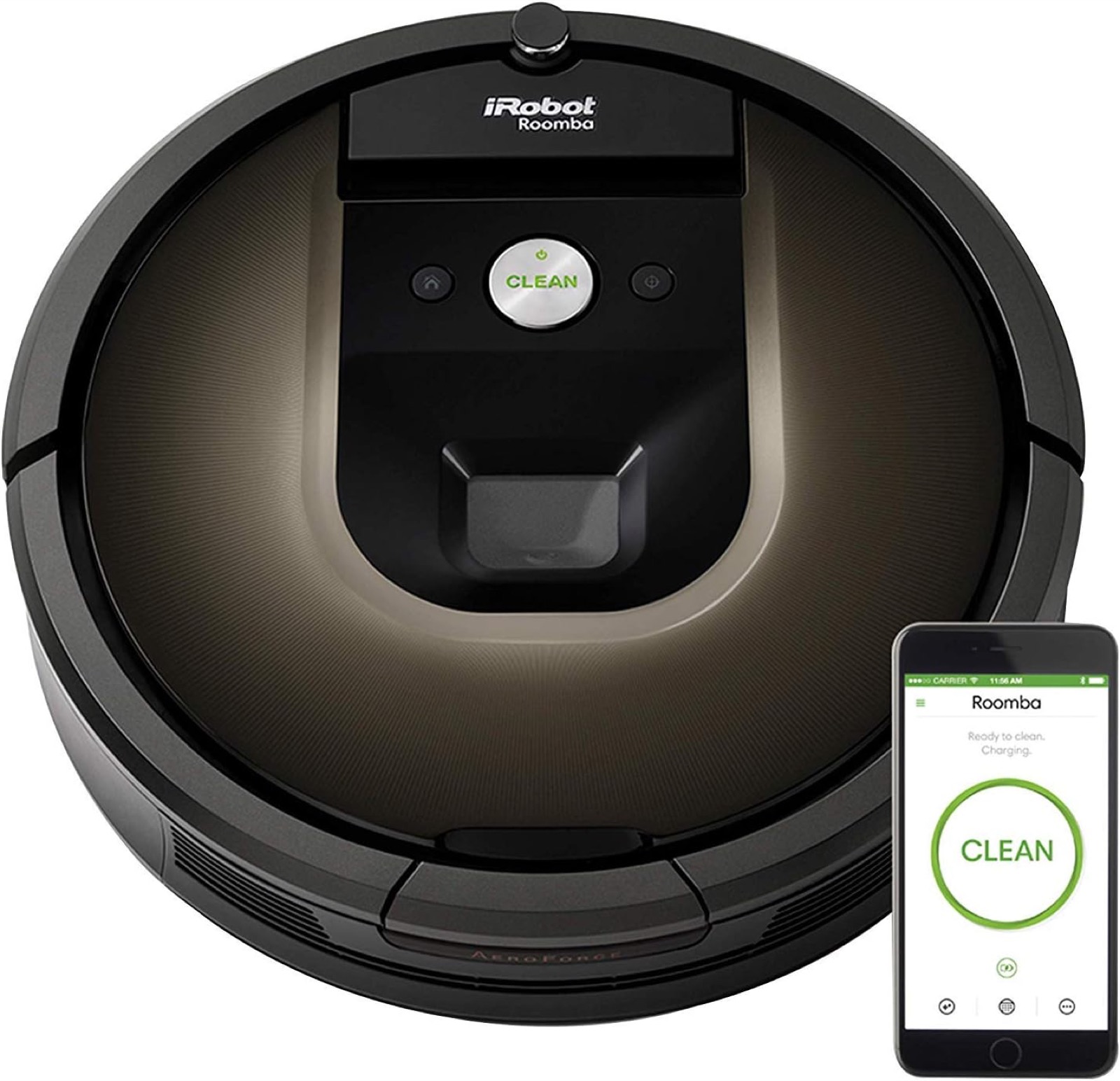
The Roomba 980 follows the classic circular shape with a protruding front bumper and a low profile (3.6 inches). The top houses the camera for navigation, the power button, a clean button, and a home button. The dustbin is accessible via a latch on the front and holds 500 ml (0.13 gallons). For comparison, most modern robots have larger bins and auto-empty options.
Setup is straightforward: plug in the charging dock (the 980 uses the older Home Base without auto-empty), install the iRobot HOME app, and connect to your 2.4 GHz Wi-Fi network. The app walks you through connecting, ensuring your robot is on the latest firmware, and performing a "Cleaning Pass" to create an initial map. This first run takes a bit longer as the camera learns the room layout. Mapping quality is decent, it will show an outline of rooms, but it’s not as crisp or consistent as lidar-based maps. The app allows you to label rooms (e.g., "Kitchen", "Living Room") and send the robot to clean a specific area, though the latter requires setting up a clean zone or the robot’s position manually. It works for basic routines, but it’s less intuitive than newer competitors.
Cleaning Performance
Underneath, the 980 uses iRobot’s three-stage cleaning system: a rubber brush roll paired with a fine bristle brush and a side brush. The rubber brush is tangle-friendly and good for pet hair, while the bristle brush helps dig into carpets. On hard floors, the 980 performs adequately, picking up crumbs and dust. On carpets, Carpet Boost technology automatically increases suction when the robot senses a dense surface, shifting from better run time to deeper agitation. This works well and noticeably improves carpet cleaning compared to non-boost rooms, but it is still not as powerful as newer high-end models like the Roborock S8 or Roomba j9+. The side brush does a decent job sweeping edges, though some particles are occasionally flicked away.
The lack of an auto-empty bin is a major drawback. The small-ish 500 ml bin fills up quickly, especially if you have pets. You’ll need to empty it after every cleaning or every other large space. In contrast, an auto-empty base can last weeks.
Navigation and Mapping
The camera-based vSLAM system is the 980’s standout tech. It uses upward-facing camera to identify visual landmarks (ceilings, windows, furniture edges) to triangulate its position. In well-lit rooms with distinct features, it works surprisingly well: the robot treks in orderly overlapping lines, covers the space efficiently, and returns to its dock when done. It can also resume after a charging pause in multiple-room cleaning.
However, the camera has limitations. In dim interiors, dark rooms, or houses with extremely uniform (white ceiling, no fixtures) architecture, the navigation can become confused, resulting in missed spots or repeated passes. On high-contrast or reflective flooring (like dark tile), the cliff sensors may also cause false stops. Later Roomba models (900 series and j series) have improved, but the 980 remains among the less reliable in tricky settings. Additionally, the 980 has no front-facing camera for obstacle avoidance, it relies on bump-and-sense. It will roll into and over low cords, socks, or small toys, potentially getting stuck or pushing mess around.
App and Smart Features
The iRobot HOME app is clean and responsive. You can schedule cleanings (including per-room timing), start or stop the robot, and view cleaning history. The map shows a top-down view of the floor plan with labeled rooms. You can send the robot to a specific room by tapping its name on the map, this feature works well but requires the robot to have previously mapped the entire floor. Unlike some competitors, the 980 cannot perform zone cleaning without setting up a rule in the app. Voice control via Alexa or Google Assistant is straightforward: you can ask it to start or dock the robot.
All that said, the app lacks predictive maintenance alerts (like how many hours until filter change) and lacks the advanced features found in newer iRobot models, such as PreciSense dirt detection or smarter room-by-room recommendations.
Comparison with Alternatives
| Product | Price (2026) | Key Spec | Verdict |
|---|---|---|---|
| iRobot Roomba 980 | $250-$350 | Camera vSLAM, 1700Pa | Only buy if under $250 and you don’t mind manual dustbin changes. |
| iRobot Roomba j7+ | $599 | AI obstacle avoidance, auto-empty | Best iRobot choice for peace of mind; avoids cords and pet waste. |
| Roborock S7 MaxV | $499 | Lidar + AI, mopping, 2500Pa | Superior mapping, stronger suction, and integrated mopping, best overall value. |
The Roomba j7+ brings PrecisionVision AI that can recognize and avoid cords, pet accidents, and small objects, a huge upgrade from the 980’s blind bumping. It also comes with the Clean Base Auto-Empty dock, eliminating daily emptying. The Roborock S7 MaxV uses lidar for faster, more accurate mapping that works even in pitch black. It also includes a vibrating mop pad that can be raised for carpet avoidance, all at a compelling price. If you need the auto-empty, the j7+ is the clear iRobot choice, while the Roborock offers the best overall performance for the money.
Pros and Cons
- Pro: Excellent carpet cleaning with Carpet Boost.
- Pro: Camera mapping that learns and remembers floor plans.
- Pro: Trusted brand with decent app and voice control.
- Con: No auto-empty bin; dustbin is small and must be emptied often.
- Con: Navigation can struggle in low-light or on dark floors.
- Con: No obstacle avoidance, bumps into furniture and cords.
- Con: Overpriced at typical $300 when superior options are available.
Final Verdict
The iRobot Roomba 980 remains a capable cleaner, especially on carpets, but it is overshadowed by the progress of the past decade. Its camera navigation is decent but not reliable enough for homes with many obstacles, and the inconvenience of a manual dustbin is a deal-breaker for many. At the $250-$350 price point, you can find a new Roborock S4 Max or an older Roomba 600 series at a deeper discount. Unless you score a brand-new unit for under $200 and are fully okay with these limitations, we advise skipping the 980 and putting your money into a modern robot vacuum that will serve you better for years to come.
Best for: Budget-minded buyers who find a deep discount on a new unit and do not mind emptying the dustbin every day.
Skip if: You prefer cutting-edge navigation, auto-empty bins, or you have a home with many cords, toys, or dark rooms.
Get it if
Budget-minded buyers who find a deeply discounted new unit (under $250) and don't mind emptying the small dustbin daily.
Skip it if
You want auto-empty, advanced obstacle avoidance, or reliable mapping in all light conditions.
$250-$350 (market range as of 2026)
Affiliate links support the site at no cost to you.