the wire · #ai · 2026-10-27
Firefox’s Smart Window adds AI form filling and webpage monitoring
Cech This Review
Mozilla is taking a significant step toward making web browsing more intelligent with the latest update to Firefox Smart Window. According to reporting by The Verge, this new capability allows the browser to automatically fill out online forms by analyzing the content of your currently open tabs. This is not just a simple copy paste function. It uses artificial intelligence to understand context and extract relevant details from various sources.
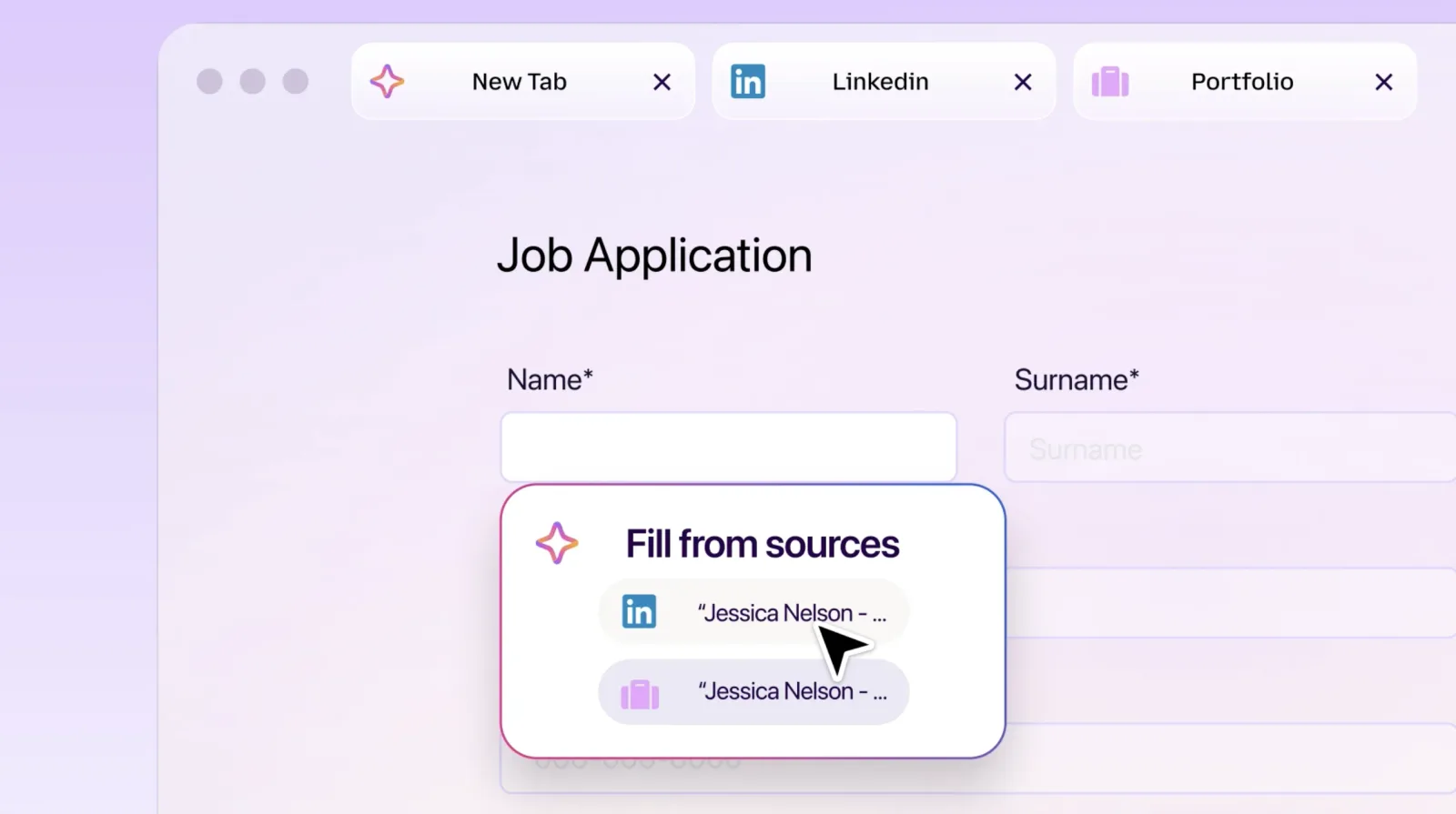
The most practical application of this feature appears to be in professional scenarios. Mozilla highlights that you can use Smart Window to pull your work history from an open LinkedIn profile or an online portfolio. The system then intelligently maps this information into the corresponding fields of a job application form. This reduces the tedious manual entry that often discourages users from applying for roles they are genuinely interested in.
The user experience is designed to be transparent and controlled. You do not have to trust the AI blindly. To activate the feature, you simply click into a form that contains at least four text fields. A new option labeled Fill from sources will appear, giving you a clear view of which tabs Firefox is considering for data extraction.
This level of control is crucial for privacy conscious users. You can manually select or deselect specific tabs before the AI generates its suggestions. This ensures that you only use information you are comfortable sharing. It prevents accidental leakage of sensitive data from unrelated browsing sessions into public forms.
From a broader industry perspective, this move signals a shift in how browsers position themselves. They are no longer just gateways to the web. They are becoming active assistants that understand your digital workflow. This aligns with a growing trend where AI tools are integrated directly into the infrastructure of our daily digital interactions rather than existing as separate applications.
However, this also raises interesting questions about data security and user awareness. When an AI agent is reading your open tabs to fill forms, it is processing personal information in real time. Users need to remain vigilant about which tabs are open and what data is being exposed. The convenience of auto filling must be balanced with the responsibility of managing digital footprints.
What this means for you This update makes repetitive web tasks significantly faster. You should try it the next time you apply for a job or sign up for a service. Open your resume or LinkedIn profile in one tab and the application form in another. Click the form field and select Fill from sources to see how accurately it maps your data. This workflow can save you valuable time during your job search.
Try this prompt with your AI assistant to prepare your data Create a structured summary of my professional experience from my LinkedIn profile. Format it as a JSON object with keys for job title, company, dates, and key achievements. This will help me verify if the browser AI is extracting the correct information for form filling.
Reporting basis: original story
← back to The Wire