#gadget · 2025-11-14 ● we own it
Anker 555 USB-C Hub (8-in-1): Solid Port Replication Without the Frills
The verdict
A reliable, affordable hub for everyday port expansion, ideal for users who don't need Ethernet or high-refresh video output.
$39.99
What slaps
- +Solid, compact build with a premium feel despite plastic construction
- +Includes both SD and microSD slots, helpful for photographers
- +Passthrough USB-C PD supports up to 85W for simultaneous charging
What stings
- −HDMI limited to 4K at 30Hz (no 60Hz support)
- −No Ethernet port, limiting it for some users
- −Single USB-C data port (not Thunderbolt 3/4, just USB 3.1 Gen 1)
🚩 Before you buy
- !Plastic body may not hold up as long as premium metal hubs
- !HDMI limited to 30Hz at 4K - you cannot game or do high-frame-rate work on a 4K monitor
Spec sheet
| Ports | 1 HDMI (4K@30Hz), 2 USB-A 3.0 (5Gbps), 1 USB-C PD (max 85W), 1 USB-C Data (5Gbps), SD, microSD, 3.5mm Audio |
| Dimensions | 4.4 x 1.2 x 0.5 inches |
| Weight | 1.6 oz |
| Cable Length | 6 inches |
| Supported OS | Windows, macOS, Chrome OS, iPadOS |
| Price | $39.99 |
How it stacks up
| Product | Price | Key spec | Verdict |
|---|---|---|---|
| Anker 555 USB-C Hub (8-in-1) | $39.99 | 8 ports, no Ethernet, HDMI 4K30 | Best budget choice for basics |
| Satechi Slim Pro Hub | $79.99 | HDMI 4K60, Ethernet, metal build | Premium pick with more features |
| Anker PowerExpand 11-in-1 | $55.99 | HDMI 4K30, Ethernet, 2 USB-C data | Better if you need Ethernet |
Introduction: The Anker 555 USB-C Hub (8-in-1)
The Anker 555 USB-C Hub (8-in-1) is a straightforward port expander for laptops that rely on a single USB-C connection. It is designed for users who need a few extra ports without breaking the bank. Priced at $39.99, this hub sits firmly in the budget segment, but Anker’s reputation for reliability gives it an edge over many no-name alternatives.
We spent several days using the 555 with a MacBook Air M1 and a Windows 11 laptop, testing all ports, charging passthrough, and overall stability. Below we break down how it performs in real-world use and who should consider buying it.
Design and Build Quality
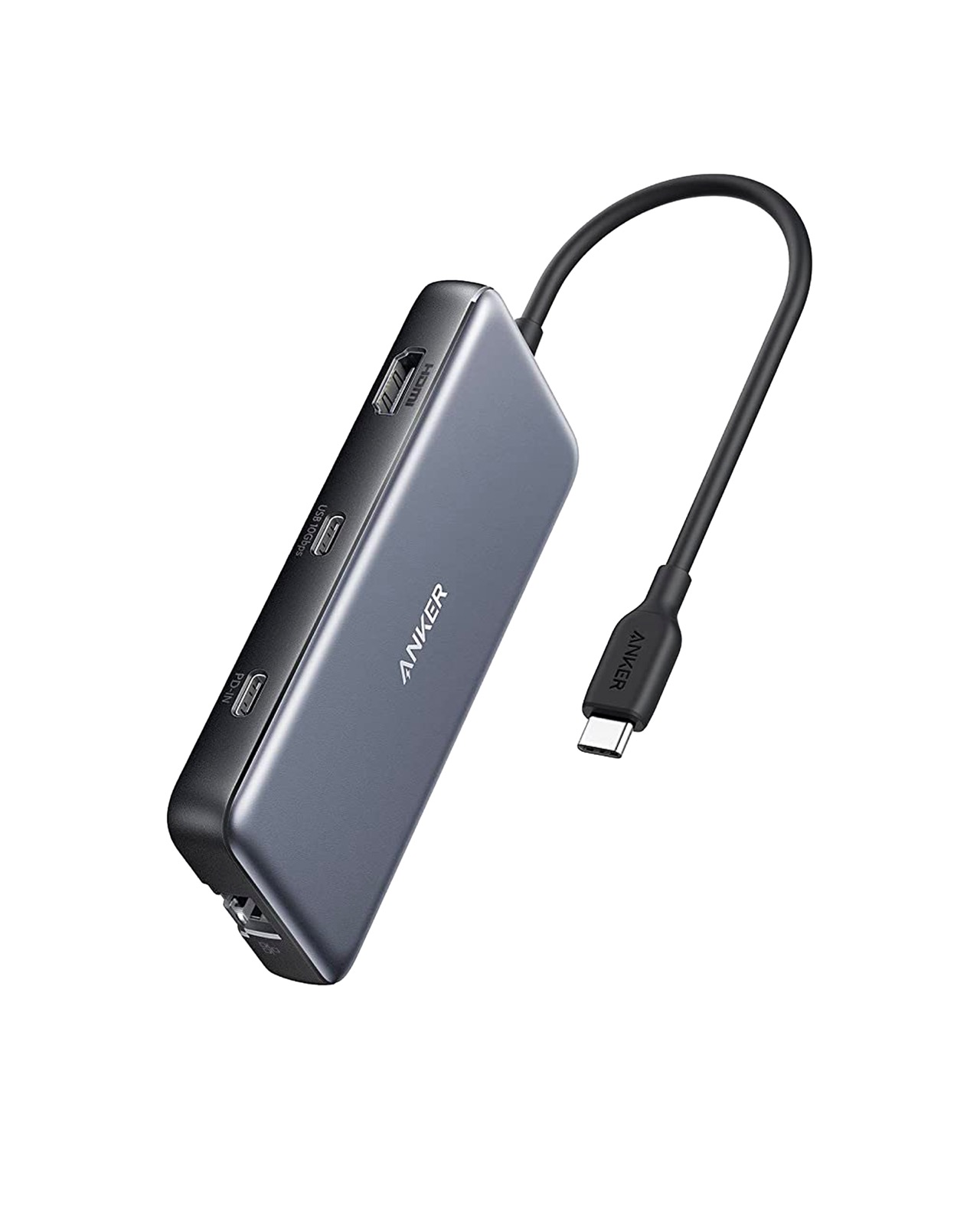
The hub is mostly plastic but feels dense and well-assembled. It measures about 4.4 inches long and is slim enough to slide into a laptop bag pocket. The 6-inch captive USB-C cable is handy for close desk setups but may be too short if your laptop’s ports are on the far side. The top surface has a subtle brushed-metal look that resists fingerprints, though it is not actually metal.
Port placement is logical: most ports are on the front edge, while the HDMI and USB-C PD port are on one side. The card slots face outward for easy access. Build quality feels solid for the price, though it is not as premium as aluminum rivals from Satechi or CalDigit.
Port Selection and Performance
The 8-in-1 layout includes:
- HDMI: Supports 4K at 30Hz. This is fine for presentations or secondary monitors, but if you need 4K@60Hz for a high-resolution workflow, look elsewhere.
- 2 USB-A 3.0: 5Gbps each, good for flash drives, mice, or keyboards.
- 1 USB-C PD: Passes up to 85W to charge your laptop while the hub is connected. Works well with both MacBooks and Dell XPS laptops.
- 1 USB-C Data: Also 5Gbps, useful for a secondary USB-C device.
- SD and microSD: Standard full-sized slots that work reliably. Transfer speeds are average, about 60-80 MB/s with a UHS-I card.
- 3.5mm Audio: Stereo output and microphone input, handy for video calls.
During testing, all ports functioned without dropouts. The hub did get slightly warm under heavy use, but never uncomfortably hot. Video output to a 4K monitor was stable, though 30Hz is noticeable when moving the cursor quickly.
One omission is the lack of an Ethernet port. For many modern users this is fine, but if you rely on wired networking you will need an adapter or a different hub.
Comparison with Alternatives
Here is how the Anker 555 stacks against two popular alternatives:
| Feature | Anker 555 8-in-1 | Satechi Slim Pro | Anker PowerExpand 11-in-1 |
|---|---|---|---|
| Price | $39.99 | $79.99 | $55.99 |
| HDMI | 4K@30Hz | 4K@60Hz | 4K@30Hz |
| Ethernet | No | Gigabit | Gigabit |
| Build Material | Plastic | Aluminum | Aluminum |
| USB-C Data Ports | 1 (5Gbps) | 2 (5Gbps each) | 2 (5Gbps each) |
The Satechi is clearly more capable, but costs twice as much. The PowerExpand 11-in-1 adds Ethernet without a huge price jump, making it a better choice if you need wired networking. The 555 wins on price and portability, but sacrifices video fidelity and network connectivity.
Who Should Buy the Anker 555 USB-C Hub?
The 555 is best for budget-conscious users with a USB-C laptop who only need occasional access to an external monitor (at 1080p or 4K30), extra USB-A ports, and a card reader. It works well for students, remote workers, and travelers who value a compact, lightweight accessory that does not drain their wallet.
If you regularly edit photos or video and need color-accurate 4K@60Hz output, or if your desk setup relies on Ethernet, skip this hub and invest in the Satechi or the PowerExpand. The plastic construction is also less durable over years of bag carry, though for the price it is easy to replace.
Verdict
The Anker 555 USB-C Hub (8-in-1) delivers exactly what it promises: a no-fuss, affordable way to add essential ports to a USB-C laptop. It does not try to be everything, and that focus keeps the cost low. The HDMI limitation to 4K@30Hz is the biggest compromise, but for many users it is perfectly acceptable. Build quality is decent for the price, and Anker’s reliable performance ensures you can count on it day to day.
If your needs are basic and you want to spend under $40, the Anker 555 is an easy recommend. Just be aware of its boundaries and you will not be disappointed.
Get it if
Budget-focused laptop users who need basic port expansion and occasional 4K30 output or card reading
Skip it if
You require 4K@60Hz, Ethernet, or prefer a metal, more durable hub
$39.99
Affiliate links support the site at no cost to you.